top of page
malvern medical centre online booking portal

Already a patient?
Click below to log in to the Patient Portal

Please Start Booking Your Appointment Here by Selecting the Appointment Type Below

REGULAR FAMILY DOCTOR APPOINTMENT

See your family doctor in person or by phone for assessment, treatment, or follow-up care.


You must have a family doctor at Malvern Medical Centre to book an appointment.

Note: For Physicals, please call the clinic

Same Day or Next Day Appointments

Disclaimer: Same-day and next-day bookings are subject to availability and limited slots, if you don't see any available slots, go back to the portal and use the regular appointment link. Please note that not all doctors offer this option. We recommend calling the clinic directly to confirm availability.

Malvern Medical Centre Online Booking Portal

Book Your Appointment Online – Quick and Easy!

​Schedule your next appointment anytime, anywhere with our convenient online booking portal. Fast, simple, and available 24/7, so you can choose a time that works best for you!

Booking Your Appointment Online: A Step-by-Step Guide

1. 
Select Appointment Type: Choose whether you want an in-person or phone appointment.

Note: Not all doctors offer phone appointments, and some may need to be booked directly by the doctor or the secretary.

If you’re unsure, please call the clinic to confirm if your doctor offers phone appointments.

Malvern Book Regular Appointment
Malvern Book Phone Appointment
Malvern How to book an appointment

2. 
Complete the Form: You will be redirected to another window to fill out the booking form.

  • Carefully read the instructions provided.

  • Select or type in the reason for your appointment. This helps the doctor understand your needs in advance.

3. 
Select Appointment Date and Time.

  • Pick your preferred appointment date and time.

  • A summary of your appointment will be displayed at the bottom of the page.

  • To make changes, simply select a different date and time.

Malvern How to book an appointment

4. 
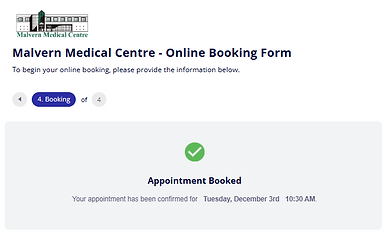
Finalize Booking: Click Book Appointment to complete your booking.

  • You will receive a confirmation message that your appointment was successfully booked.

  • A text and email confirmation will also be sent to you.

Have questions about booking online?
Find quick answers to make your experience seamless

Frequently asked questions

Contact Us

Phone: 416-291-7719

Fax: 416-287-3775

*Medical emergencies please call 911

Our Location

520 Ellesmere Rd, Suite 501

Scarborough, ON

M1R 0B1

Stay Connected

  • Facebook
  • Instagram
  • LinkedIn

Email: info@malvernmedical.ca


Before you email us, please read:

Our email address is offered as a convenience for three purposes only: (1) requesting an appointment (booking through the [patient portal] is faster), (2) asking about the status of a referral, (3) sending forms that require a physician's completion, such as insurance or disability forms, and (4) contacting us about a specific concern only if you have been instructed by your physician to do so.

Email is not for medical care. We cannot provide medical advice, assess symptoms, renew prescriptions, or respond to urgent concerns by email. If you have a medical emergency, call 911 or go to the nearest emergency department. For urgent same-day matters, call the clinic at 416-291-7745

Emails are read during business hours only and may take up to 2 business days to receive a reply. Email is not a secure form of communication: messages can be intercepted or misdirected, and confidentiality cannot be guaranteed in transit. By emailing the clinic you accept this risk and consent to our replying to the address you write from. Please include only the minimum personal health information necessary — your name, date of birth, and a phone number are usually enough for us to find your file and call you back.

Relevant emails may be added to your medical record. Messages outside the purposes listed above may not receive a response.

© 2024 by Malvern Medical Centre

bottom of page