

Register with a family doctor in Scarborough, no waitlist
Malvern Medical Centre is currently accepting new patients from across Scarborough, Toronto, and the greater Toronto area, with no waitlist. Registering as a new patient is the first step toward connecting with a family doctor at our clinic.
Simply complete our New Patient Registration Form to get started. If you have a preference for a male or female family doctor, you can indicate that as part of your registration.
Malvern Medical Centre has supported families across Scarborough since 1976, with physicians averaging 15 years of experience and hundreds of Google reviews from patients across the GTA.
If you encounter any issues, please email us at info@malvernmedical.ca
How to register: step by step
Registration takes just a few minutes, and you will know exactly what to expect at every step, from your first form to your first appointment.

Step 1: Start your registration form
Complete the registration form with your name, date of birth, email address, and health card information. If you have Interim Federal Health (IFH) coverage, please email a copy of your IFH document showing your UCI number to info@malvernmedical. ca after submitting the form.
Note: For IFH patients, after completing the form, please email a copy of your IFH document showing the UCI number to info@malvernmedical.ca.
_jfif.jpg)
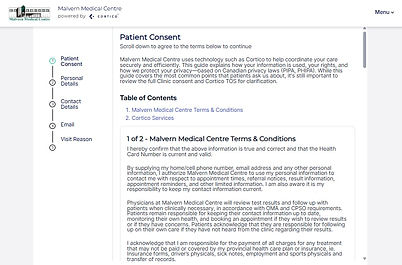
Step 2: Review consent and terms
Review and accept the patient consent form and Malvern Medical Centre's terms and conditions.
_jfif.jpg)
Step 3: Verify your personal information
Confirm that your personal information is accurate and up to date.
_jfif.jpg)
Step 4: Complete your contact details
Provide your current phone number and email address so our team can reach you with updates about your registration.

Step 5: Share your information and doctor preference
Complete the patient information form to give your doctor an overview of your health background. You may select a preferred physician, including a male or female family doctor. If you have no preference, we will match you with the next available doctor.

Step 6: Registration confirmation
Once your registration is complete, your patient chart is created in our system automatically. We will email you a booking link along with the details of the physician you have been matched with.
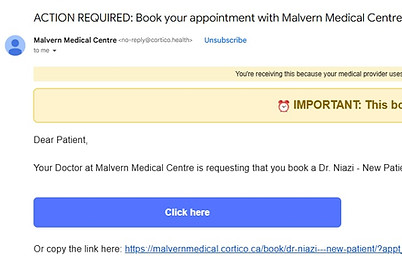
Step 7: Book your first appointment
You will receive an email from Cortico, our secure platform for booking and medical documents. Use this link to book your first appointment with your matched family doctor.
Please note that once you have signed the enrollment form during your first appointment, we are no longer able to switch you to a different doctor within the clinic.
Note: If you encounter any issues or would like to request a change to the doctor you were matched with, please email info@malvernmedical.ca.
Please be advised that once you have signed the enrollment form during your first appointment,
we are no longer able to switch you to another doctor within the clinic.